

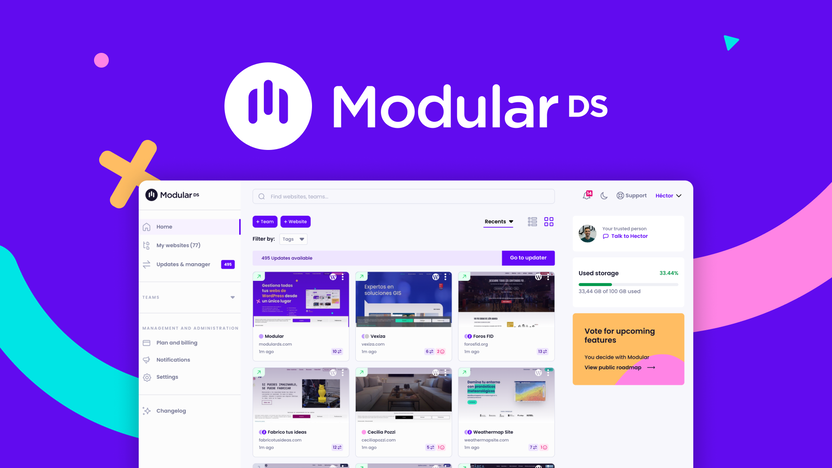
Maintaining multiple WordPress sites can be a headache. Managing updates, backups, and security checks takes time.
But what if you could automate these tasks? Introducing the Modular DS Lifetime Deal. This platform helps you handle WordPress maintenance tasks effortlessly. From updating plugins to monitoring security, Modular DS centralizes everything. It’s designed for busy professionals who manage multiple sites. You can save time, improve site security, and generate detailed client reports easily. Learn how Modular DS can simplify your workflow and boost your productivity. Check out Modular DS now and see how it can transform your WordPress management.
Introduction To Modular Ds
Managing multiple WordPress sites can be a daunting task. This is where Modular DS comes into play. It is a comprehensive solution designed to streamline and automate WordPress maintenance tasks. This tool simplifies the process, making it more efficient and secure. Let’s delve deeper into what Modular DS offers.
What Is Modular Ds?
Modular DS is a powerful, user-friendly platform. It centralizes and automates various WordPress maintenance tasks. The goal is to make managing multiple WordPress sites easier and more efficient.
| Main Features | Description |
|---|---|
| Plugin and Theme Management | Install, update, activate, deactivate, and delete plugins or themes across multiple sites from a single dashboard. |
| Security Monitoring | Automate maintenance tasks and monitor security vulnerabilities in real-time. |
| Uptime Monitoring | Reliable uptime monitoring with custom intervals and SSL certificate expiration notifications. |
| Cloud-based Backups | Options for monthly, weekly, daily, or instant backups. |
| Client Reports | Generate data-rich reports including updates, backups, uptime, and data from Google services. |
| GDPR Compliant | Ensures data protection and privacy compliance. |
Purpose Of Modular Ds In WordPress Maintenance
The primary purpose of Modular DS is to automate and streamline WordPress maintenance tasks. This ensures that your websites are always up-to-date and secure. Here are some key benefits:
- Save Time and Effort: By automating tasks, you free up time for other important activities.
- Enhance Site Security: Regular updates and security monitoring keep your sites safe from vulnerabilities.
- Ensure Website Uptime: Built-in monitoring tools help maintain consistent website performance.
- Cloud-based Backups: Easily recover from crashes or data loss with reliable backups.
- Comprehensive Reports: Demonstrate the value of your services to clients, leading to timely and full payments.
With these features and benefits, Modular DS stands out as an essential tool for WordPress maintenance.
Key Features Of Modular Ds
Modular DS offers a range of features designed to automate and simplify WordPress maintenance tasks. This powerful platform helps manage multiple sites efficiently and ensures they are always secure and up-to-date. Below, we dive into the key features that make Modular DS stand out.
With Modular DS, you can schedule automated backups for your WordPress sites. Choose from monthly, weekly, daily, or instant backups to fit your needs. These cloud-based backups ensure your data is always safe and easily recoverable in case of crashes or data loss.
Modular DS provides real-time security monitoring to identify and address vulnerabilities quickly. This feature keeps your sites secure by monitoring for threats and ensuring all plugins, themes, and core versions are up-to-date.
Ensure your websites run smoothly with performance optimization tools. Modular DS includes uptime monitoring with custom intervals and SSL certificate expiration notifications. This helps maintain optimal site performance and reliability.
Manage updates effortlessly with Modular DS. You can install, update, activate, deactivate, and delete plugins or themes across multiple WordPress sites from a single dashboard. This feature saves time and ensures all components are consistently updated.
Modular DS features a user-friendly dashboard that centralizes all maintenance tasks. The intuitive interface makes it easy to manage multiple sites, generate data-rich reports, and monitor overall site health. The platform also offers white-label options for a branded experience.
| License Tier | Websites | Storage | User(s) | Uptime Monitor |
|---|---|---|---|---|
| License Tier 1 | 7 | 35 GB | 1 | 5 minutes |
| License Tier 2 | 15 | 70 GB | 1 | 5 minutes |
| License Tier 3 | 30 | 110 GB | 2 | 2 minutes |
| License Tier 4 | 50 | 175 GB | 3 | 2 minutes |
Experience the convenience and efficiency of Modular DS. Simplify your WordPress maintenance tasks and secure recurring revenue with this robust platform.
Automated Backups
Automated backups are crucial for maintaining the integrity and security of your WordPress sites. With Modular DS, you can schedule backups to occur regularly, ensuring your data is always safe and recoverable.
Benefit Of Regular Backups
Regular backups are essential for several reasons:
- Data Security: Protect your site from data loss due to crashes or security breaches.
- Peace of Mind: Know that your content is safe even if something goes wrong.
- Quick Recovery: Restore your site quickly without losing important updates or content.
How Automated Backups Work
With Modular DS, automated backups are simple to set up:
- Choose your backup frequency: monthly, weekly, daily, or instant.
- Configure your settings via a user-friendly dashboard.
- Backups are stored in the cloud, ensuring data safety and accessibility.
These backups run in the background, allowing you to focus on other important tasks without worrying about data loss.
Ease Of Restoration
Restoring your site from a backup is straightforward:
- Access your backup files from the cloud storage.
- Select the backup you wish to restore.
- Click restore and the system will handle the rest.
This process ensures minimal downtime and a smooth recovery, helping you maintain a seamless user experience for your visitors.

Credit: www.linkedin.com
Security Monitoring
Ensuring your WordPress sites are secure is crucial. Modular DS offers robust security monitoring features that help protect your websites from potential threats.
Real-time Threat Detection
With real-time threat detection, Modular DS actively monitors your sites. It scans for vulnerabilities and alerts you immediately if any threats are detected. This proactive approach helps prevent attacks before they cause damage.
Automatic Malware Removal
Modular DS also includes automatic malware removal. If malware is detected, the system can remove it quickly and efficiently. This feature ensures your sites remain clean and secure without manual intervention.
Importance Of Regular Security Checks
Regular security checks are vital for maintaining the integrity of your WordPress sites. Modular DS automates these checks, ensuring all plugins, themes, and core versions are up-to-date. This reduces the risk of security vulnerabilities.
| Feature | Benefit |
|---|---|
| Real-Time Threat Detection | Immediate alerts on security threats |
| Automatic Malware Removal | Quick removal of detected malware |
| Regular Security Checks | Up-to-date plugins, themes, and core versions |
Performance Optimization
Performance optimization is crucial for any WordPress site. Modular DS ensures your sites run smoothly, efficiently, and quickly. This section focuses on the various techniques and tools provided by Modular DS to enhance performance.
Speed Enhancement Techniques
Speed is essential for user retention. Modular DS offers several techniques to improve the loading times of your WordPress sites.
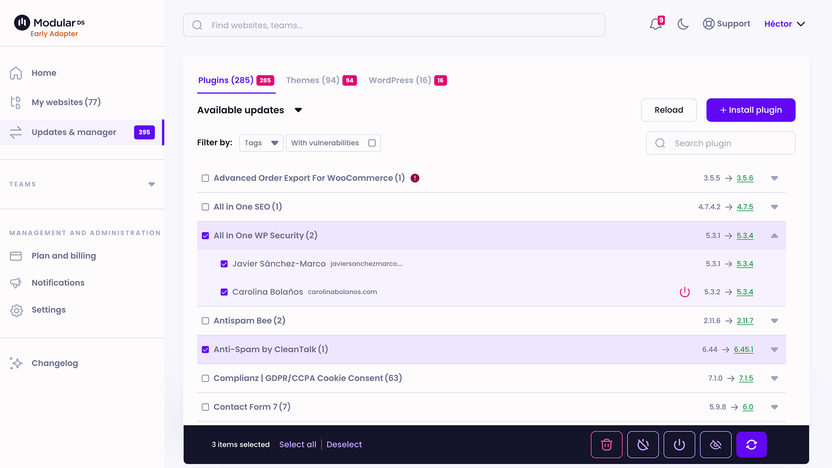
- Plugin and Theme Management: Install, update, activate, deactivate, and delete plugins or themes across multiple sites from a single dashboard. This ensures all components are up-to-date and optimized.
- Cloud-Based Backups: Regular backups help maintain site speed by ensuring data integrity and quick recovery. Choose from monthly, weekly, daily, or instant backups.
- PageSpeed Insights: Integrate PageSpeed data to monitor and improve site load times.
Resource Usage Monitoring
Managing resources effectively ensures the smooth functioning of your WordPress sites. Modular DS provides tools to monitor and optimize resource usage.
- Real-Time Security Monitoring: Keep track of security vulnerabilities to prevent resource-draining attacks.
- Uptime Monitoring: Reliable uptime monitoring with custom intervals ensures that your site is always accessible. Receive notifications for SSL certificate expiration.
- Comprehensive Reports: Generate data-rich reports that include updates, backups, and uptime stats. These reports help in tracking resource utilization.
Impact On User Experience
Optimized performance directly improves user experience. Modular DS helps enhance various aspects of your site to keep users engaged.
- Fast Loading Times: Users expect quick access to content. Speed enhancement techniques ensure that your site loads swiftly, reducing bounce rates.
- Reliable Uptime: Consistent uptime monitoring guarantees that your site remains available, fostering user trust and satisfaction.
- Security and Stability: Regular updates and security monitoring protect user data, ensuring a safe and stable browsing experience.
Credit: appsumo.com
Update Management
Managing updates on multiple WordPress sites can be a daunting task. With Modular DS, you can automate this process, ensuring your sites remain secure and up-to-date. Let’s explore the key aspects of update management:
Automated Plugin And Theme Updates
With Modular DS, you can automate the updates for plugins and themes across all your WordPress sites. This feature ensures that your sites are always running the latest versions, reducing the risk of security vulnerabilities. You no longer need to log in to each site individually. Instead, manage everything from a single dashboard.
- Install, update, activate, deactivate, and delete plugins or themes from one place.
- Save time and effort with automated updates.
- Enhance site security by keeping all components up-to-date.
Compatibility Checks
One of the biggest concerns with updates is compatibility. Modular DS performs compatibility checks before updating plugins and themes. This reduces the risk of conflicts that could break your site. You can feel confident that updates won’t cause issues.
Key benefits of compatibility checks:
| Feature | Benefit |
|---|---|
| Pre-update checks | Identify potential conflicts before they happen. |
| Conflict alerts | Receive notifications if an update may cause issues. |
| Safe updates | Ensure smooth and trouble-free updates. |
Minimizing Downtime
Downtime can be costly and frustrating. Modular DS helps minimize downtime during updates. It schedules updates during low-traffic periods, ensuring minimal disruption to your users. Additionally, it monitors your sites for any issues post-update.
Here are ways Modular DS minimizes downtime:
- Schedules updates during off-peak hours.
- Provides reliable uptime monitoring with custom intervals.
- Offers cloud-based backups for quick recovery if needed.
With these features, you can trust Modular DS to keep your WordPress sites updated and running smoothly.
User-friendly Dashboard
The Modular DS platform boasts a user-friendly dashboard that simplifies WordPress maintenance. This intuitive interface makes managing multiple sites effortless. With its clean design, even beginners can navigate it with ease.
Ease Of Navigation
The dashboard’s layout is straightforward. Key features like plugin management, theme updates, and security monitoring are easily accessible. Users can quickly find what they need without getting lost in complex menus. This ease of navigation saves time and reduces frustration.
Centralized Management
One of the standout features is centralized management. From a single dashboard, users can manage:
- Multiple WordPress sites
- Automate maintenance tasks
- Monitor security vulnerabilities
This centralized approach enhances efficiency. It eliminates the need to log in to each site individually, streamlining the entire maintenance process.
Customizable Alerts And Notifications
With Modular DS, users can set up customizable alerts and notifications. These can be tailored to individual preferences, ensuring that users are always informed about critical updates. For instance, users can receive notifications for:
- Plugin or theme updates
- Security issues
- SSL certificate expirations
- Uptime monitoring alerts
This proactive approach helps in maintaining the health and security of all managed WordPress sites.
| License Tier | Websites | Storage | User(s) | Uptime Monitor | Price | Original Price |
|---|---|---|---|---|---|---|
| License Tier 1 | 7 | 35 GB | 1 | 5 minutes | $49 | $97 |
| License Tier 2 | 15 | 70 GB | 1 | 5 minutes | $98 | $196 |
| License Tier 3 | 30 | 110 GB | 2 | 2 minutes | $198 | $431 |
| License Tier 4 | 50 | 175 GB | 3 | 2 minutes | $299 | $673 |
Overall, the user-friendly dashboard of Modular DS significantly enhances the maintenance of multiple WordPress sites. It offers a combination of ease of navigation, centralized management, and customizable alerts. This makes it an indispensable tool for anyone looking to streamline their WordPress maintenance tasks.
Pricing And Affordability
The affordability of Modular DS makes it a standout choice for WordPress maintenance. Each tier offers an impressive range of features at competitive prices.
Lifetime Deal Overview
The Modular DS Lifetime Deal comes with four distinct license tiers. Each tier is designed to cater to different needs and budgets. Here is a detailed overview:
| License Tier | Price | Websites | Storage | Users | Uptime Monitor |
|---|---|---|---|---|---|
| License Tier 1 | $49 (originally $97) | 7 | 35 GB | 1 | 5 minutes |
| License Tier 2 | $98 (originally $196) | 15 | 70 GB | 1 | 5 minutes |
| License Tier 3 | $198 (originally $431) | 30 | 110 GB | 2 | 2 minutes |
| License Tier 4 | $299 (originally $673) | 50 | 175 GB | 3 | 2 minutes |
Cost Comparison With Competitors
Comparing Modular DS with competitors reveals its cost-effectiveness. Many similar tools charge monthly fees. Modular DS offers a one-time payment for lifetime access. Here’s how it stacks up:
- Competitor A: $20/month per site
- Competitor B: $15/month per site
- Competitor C: $25/month per site
Over a year, these costs add up. For instance, managing 15 sites with Competitor A costs $3,600 annually. With Modular DS, a one-time payment of $98 covers the same.
Value For Money
Investing in Modular DS brings significant value. The platform offers:
- Comprehensive maintenance tools
- Real-time security monitoring
- Cloud-based backups
- Data-rich client reports
These features save time and enhance security. The GDPR compliance and white-label options add professional value. With a 60-day money-back guarantee, risk is minimal. The ability to upgrade or downgrade within 60 days ensures flexibility.
Pros And Cons Of Modular Ds
Modular DS is a robust platform designed to automate WordPress maintenance. It offers a centralized dashboard to manage multiple sites, making it ideal for web developers and agencies. Let’s dive into the pros and cons of using Modular DS based on real-world experiences and user feedback.
Pros Based On Real-world Usage
- User-Friendly Dashboard: The interface is intuitive, allowing users to manage multiple WordPress sites effortlessly.
- Automated Maintenance: Automates tasks like updates and security checks, saving significant time and effort.
- Real-Time Monitoring: Monitors uptime and security vulnerabilities with custom intervals.
- Cloud-Based Backups: Offers monthly, weekly, daily, or instant backups, ensuring data safety.
- Comprehensive Reporting: Generates detailed client reports, including updates, backups, and analytics data.
- GDPR Compliance: Ensures data handling meets GDPR standards, enhancing client trust.
- White-Label Options: Allows branding the platform with your logo and colors, creating a professional look.
Cons And Limitations
- Limited Users: Lower license tiers offer limited user access, which may not suffice for larger teams.
- Storage Constraints: The storage provided may be insufficient for websites with extensive media files.
- License Activation: Must activate the license within 60 days, which can be restrictive.
- New Users Only: The deal is only available for new Modular DS users, excluding existing accounts.
- Upgrade Limitations: Users can only upgrade or downgrade between five license tiers within 60 days.
| License Tier | Websites | Storage | User(s) | Uptime Monitor | Price |
|---|---|---|---|---|---|
| Tier 1 | 7 | 35 GB | 1 | 5 minutes | $49 |
| Tier 2 | 15 | 70 GB | 1 | 5 minutes | $98 |
| Tier 3 | 30 | 110 GB | 2 | 2 minutes | $198 |
| Tier 4 | 50 | 175 GB | 3 | 2 minutes | $299 |
Credit: lifetimo.com
Recommendations For Ideal Users
Modular DS is a versatile tool designed to ease the burden of WordPress maintenance. It automates various tasks, making it perfect for different user groups. Let’s explore who can benefit most from this platform.
Who Will Benefit Most From Modular Ds?
- Freelancers: Those managing multiple WordPress sites can streamline tasks, saving valuable time.
- Agencies: Perfect for agencies handling numerous clients. Modular DS helps in delivering consistent results.
- Business Owners: Ideal for small business owners looking to maintain their websites without technical hassle.
- Developers: Developers can focus more on coding and less on maintenance tasks.
Scenarios Where Modular Ds Excels
Modular DS stands out in specific scenarios, ensuring efficiency and reliability.
- Managing Multiple Sites: Easily handle plugin updates, theme changes, and security checks across many sites from one dashboard.
- Real-Time Security Monitoring: Get instant alerts on security vulnerabilities, ensuring your sites remain secure.
- Cloud-Based Backups: Opt for monthly, weekly, daily, or instant backups to prevent data loss.
- Client Reporting: Generate detailed reports for clients, including updates, uptime, and analytics data.
- GDPR Compliance: Maintain compliance with GDPR standards, offering white-label options for branding.
| License Tier | Websites | Storage | User(s) | Uptime Monitor |
|---|---|---|---|---|
| License Tier 1 | 7 | 35 GB | 1 | 5 minutes |
| License Tier 2 | 15 | 70 GB | 1 | 5 minutes |
| License Tier 3 | 30 | 110 GB | 2 | 2 minutes |
| License Tier 4 | 50 | 175 GB | 3 | 2 minutes |
Frequently Asked Questions
What Is Modular Ds Lifetime Deal?
Modular Ds Lifetime Deal offers a one-time purchase for lifetime access. It helps automate WordPress maintenance tasks efficiently.
How Does Modular Ds Automate WordPress Maintenance?
Modular Ds automates tasks like updates, backups, and security checks. This reduces manual work and ensures your site runs smoothly.
Is Modular Ds Suitable For Beginners?
Yes, Modular Ds is user-friendly and ideal for beginners. Its intuitive interface makes WordPress maintenance easy and straightforward.
What Features Does Modular Ds Offer?
Modular Ds provides automatic updates, regular backups, and security monitoring. It also includes performance optimization and detailed reporting.
Conclusion
Modular DS simplifies WordPress maintenance, boosting efficiency and security. Manage multiple sites effortlessly, ensuring they’re always updated and backed up. Save time, reduce stress, and keep clients happy with comprehensive reports. Explore the benefits and secure your deal with Modular DS now. Improve your workflow and scale your business with ease. Don’t miss out on this powerful tool.

