


PDF Reader Pro for Windows is a versatile tool. It’s an all-in-one solution for reading, editing, and managing PDF files.
This software is perfect for simplifying your document workflow. In this blog post, we will review the PDF Reader Pro Lifetime Deal for Windows. We will explore its key features, such as multi-tab viewing, advanced annotation tools, and robust editing capabilities. The tool also offers impressive conversion options and secure document handling. Whether you need to fill forms, sign documents, or protect sensitive information, PDF Reader Pro has you covered. By the end of this review, you’ll know if this lifetime deal is worth considering for your PDF management needs. For more details, you can check out the product here.
Introduction To Pdf Reader Pro Lifetime Deal For Windows
The PDF Reader Pro Lifetime Deal for Windows is an excellent opportunity for professionals seeking a comprehensive PDF solution. This deal offers a lifetime license at a one-time payment, making it a cost-effective choice for individuals and businesses alike.
What Is Pdf Reader Pro?
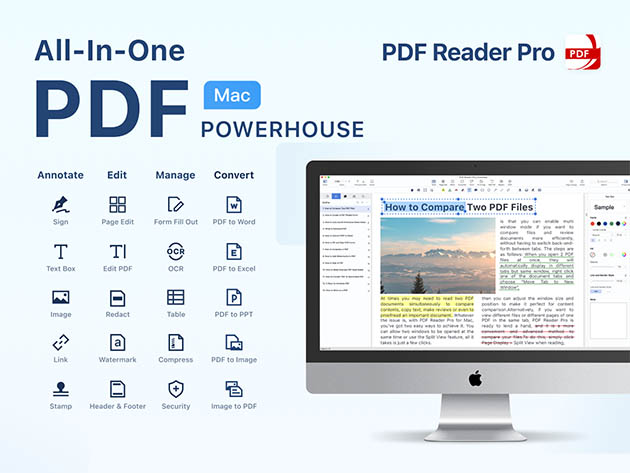
PDF Reader Pro is an all-in-one PDF office tool designed for Windows users. It simplifies document workflows by offering various features to read, edit, annotate, convert, create, OCR, fill forms, and sign PDFs.
- View & Read: Multi-tab viewer, split view mode, customizable themes.
- Annotate: Tools for PDF markup, notes, stamps, highlight, underline, strikethrough, and more.
- Edit: Edit text and pages, split & merge PDFs, insert pages, flatten PDF.
- Convert: Convert images and Office documents to PDFs, OCR for scanned PDFs.
- Fill & Sign: PDF form filler, digital signatures, create fillable forms.
- Protect: Add watermark, password protection, batch encryption, redact information.
- Additional Tools: Compress PDFs, extract images, measure distances and areas.
Purpose And Target Audience
The primary purpose of PDF Reader Pro is to enhance productivity by providing advanced PDF management features. Its target audience includes:
- Educators needing to annotate and share documents.
- IT/Security agencies requiring secure document handling.
- Product managers overseeing project documentation.
Why Choose The Lifetime Deal?
Choosing the PDF Reader Pro Lifetime Deal offers several advantages:
- Cost-effective: One-time payment of $59.99 (originally $79.99).
- Lifetime access: No recurring fees, includes all future updates.
- 60-day money-back guarantee: Refundable within 60 days of purchase.
With the PDF Reader Pro Lifetime Deal, users can access a powerful PDF toolset without ongoing costs, ensuring long-term productivity and efficiency.

Credit: www.youtube.com
Key Features Of Pdf Reader Pro
PDF Reader Pro for Windows offers a variety of tools that simplify document workflows. Below are the key features that make this tool a must-have for handling PDFs efficiently.
Comprehensive Pdf Editing Tools
PDF Reader Pro provides extensive editing features to enhance your PDF documents. You can edit text and pages, split and merge PDFs, and even insert new pages. The software also allows you to flatten PDFs for a polished finish. You can also cut, copy, and paste text easily.
| Feature | Description |
|---|---|
| Edit Text | Edit, delete, cut, copy, and paste text |
| Split & Merge | Split and merge PDF files |
| Insert Pages | Insert new pages into existing PDFs |
| Flatten PDF | Flatten PDFs for a polished look |
Advanced Annotation Capabilities
The software offers diverse tools for annotating PDFs. Users can highlight, underline, strikethrough text, and add freehand drawings. You can also create and insert stamps, take notes, and add anchored notes for better document interaction.
- Highlight, underline, and strikethrough text
- Freehand drawing tools
- Create and insert stamps
- Add text boxes and images
Seamless Pdf Conversion Options
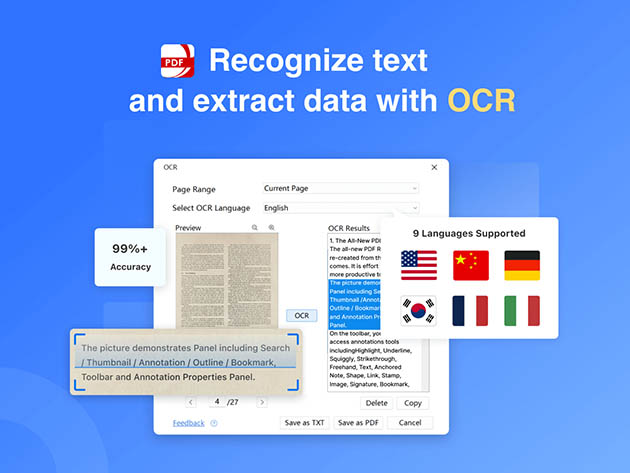
PDF Reader Pro supports converting various file formats to PDF. You can convert images like JPEG, PNG, and TIFF, as well as Office documents such as Word, PowerPoint, and Excel. The OCR feature recognizes text from scanned PDFs, making it easy to edit and search.
| Conversion Type | Supported Formats |
|---|---|
| Image to PDF | JPEG, JPG, PNG, BMP, TIFF, GIF |
| Office to PDF | Word, PowerPoint, Excel, Text |
| OCR | Recognize text from scanned PDFs |
Robust Security And Encryption
Security is a top priority with PDF Reader Pro. You can add watermarks and password-protect your PDFs. The software also offers batch encryption and the ability to redact sensitive information. These features ensure your documents remain confidential and secure.
- Add watermark to PDFs
- Password and permission protection
- Batch encryption for multiple files
- Redact sensitive information
Efficient Document Management
Managing your PDFs is straightforward with PDF Reader Pro. You can compress PDF files to reduce their size and extract high-resolution images. The software also includes tools to measure distances, perimeters, and areas within your documents.
- Compress PDF files
- Extract high-resolution images
- Measure distances, perimeters, and areas
User-friendly Interface
PDF Reader Pro boasts a user-friendly interface with customizable theme colors. You can choose from Light Mode, Dark Mode, Sepia, and Reseda Mode. The software also supports a multi-tab viewer and split-view mode, enhancing the user experience.
| Interface Feature | Description |
|---|---|
| Multi-tab Viewer | Open multiple PDFs in tabs |
| Split View Mode | View two PDFs side-by-side |
| Customizable Theme Colors | Light Mode, Dark Mode, Sepia, Reseda Mode |
Pricing And Affordability Of Pdf Reader Pro Lifetime Deal
Pdf Reader Pro for Windows offers a comprehensive solution for all your PDF needs. Its one-time payment model makes it a cost-effective choice. This section explores the pricing and affordability of this lifetime deal.
One-time Payment Overview
The lifetime deal for Pdf Reader Pro for Windows is priced at $59.99. This fee provides lifetime access to the software. The original price is $79.99, giving you a significant discount. This one-time payment covers all future updates. There are no recurring fees or hidden charges.
Cost Comparison With Competitors
Let’s compare the cost of Pdf Reader Pro with other popular PDF tools:
| Software | Pricing Model | Cost |
|---|---|---|
| Pdf Reader Pro | One-time payment | $59.99 |
| Adobe Acrobat DC | Subscription | $14.99/month |
| Foxit PhantomPDF | Subscription | $12.99/month |
| Nitro Pro | One-time payment | $159.99 |
Pdf Reader Pro offers the most affordable one-time payment option. Subscription-based competitors can cost significantly more over time.
Value For Money Analysis
- Comprehensive Features: Pdf Reader Pro includes viewing, annotating, editing, converting, OCR, filling forms, and signing PDFs.
- Future Updates: The one-time payment ensures you get all future updates, enhancing the software’s value.
- Security: Advanced security features like password protection, watermarking, and redaction ensure your documents are safe.
- Customer Support: 60-day money-back guarantee provides risk-free purchasing.
Pdf Reader Pro’s lifetime deal at $59.99 offers excellent value. Its extensive features and future updates make it a smart investment for personal and professional use.
Credit: www.stacksocial.com
Pros And Cons Of Pdf Reader Pro
PDF Reader Pro for Windows is a versatile tool for managing PDF documents. It offers a wide range of features that cater to various needs. But, like any software, it has its strengths and weaknesses. In this section, we will explore the pros and cons of PDF Reader Pro.
Advantages Of Using Pdf Reader Pro
- Multi-tab Viewer: This feature allows users to open multiple PDFs in one window, making it easier to switch between documents.
- Customizable Themes: Users can choose between Light Mode, Dark Mode, Sepia, and Reseda Mode for a comfortable reading experience.
- Annotation Tools: Diverse tools for marking up PDFs, such as highlighting, underlining, and adding notes, make document review seamless.
- Advanced Editing: Edit text, split and merge PDFs, and insert or delete pages with ease.
- Conversion Capabilities: Convert images and office documents to PDFs and use OCR to recognize text from scanned documents.
- Form Filling and Signing: Fill out forms and add digital signatures, creating fillable PDF forms is straightforward.
- Security Features: Protect documents with passwords, add watermarks, and redact sensitive information to ensure privacy.
- Additional Tools: Compress PDFs, extract high-resolution images, and measure distances, perimeters, and areas within documents.
- Lifetime Access: One-time payment of $59.99 grants lifetime access, including all future updates.
Drawbacks And Limitations
- No Mobile Support: The software is currently only available for Windows, limiting usability for mobile users.
- Learning Curve: Some users may find the extensive features overwhelming initially.
- Non-Stackable Deal: The lifetime deal is non-stackable, meaning you cannot combine multiple purchases for additional benefits.
- Code Redemption: Requires code redemption within 60 days, which might be inconvenient for some users.
User Feedback And Reviews
Users of PDF Reader Pro for Windows have shared mixed feedback. Many users appreciate the comprehensive features and ease of use. The ability to handle various PDF tasks in one software has been highlighted positively. Here are some common points from user reviews:
| Positive Feedback | Negative Feedback |
|---|---|
| Comprehensive feature set | Lacks mobile support |
| Ease of use for basic tasks | Steeper learning curve for advanced features |
| Value for money with lifetime access | Code redemption within 60 days |
Overall, PDF Reader Pro is a robust tool for those needing a reliable PDF management solution on Windows. Users have praised its functionality, though some limitations exist.
Ideal Users And Scenarios For Pdf Reader Pro
PDF Reader Pro for Windows is a versatile tool designed to cater to diverse user needs. With a wide range of features, it is suitable for professionals, students, academics, small businesses, and enterprises. The comprehensive functionalities make it an ideal choice for various scenarios.
Best Use Cases For Professionals
Professionals benefit significantly from PDF Reader Pro’s advanced editing and annotation tools.
- Lawyers can annotate and highlight legal documents.
- Architects can use the measure distances feature for accurate planning.
- Project managers can split and merge PDFs to organize project documentation.
The multi-tab viewer and split view mode enhance productivity by allowing users to compare and edit multiple documents simultaneously.
Suitability For Students And Academics
Students and academics find PDF Reader Pro to be an excellent tool for their educational needs.
- Annotate lecture notes with highlights, underlines, and strikethroughs.
- Use the OCR feature to convert scanned notes into editable text.
- Create and insert stamps for quick reference and note-taking.
The ability to convert Office documents to PDFs ensures that students can submit assignments in a universally accepted format.
Small Business And Enterprise Applications
Small businesses and enterprises can leverage PDF Reader Pro to streamline their document workflows.
- Fill and sign PDF forms digitally, reducing paperwork.
- Protect sensitive information with password and permission protection.
- Batch encryption for secure document handling.
Additionally, the ability to compress PDFs helps businesses save storage space and manage documents more efficiently.
Credit: www.stacksocial.com
Conclusion: Is Pdf Reader Pro Lifetime Deal Worth It?
The PDF Reader Pro Lifetime Deal for Windows offers a comprehensive suite of tools for managing PDF documents. This section evaluates whether the lifetime deal is a worthy investment.
Final Thoughts On Pdf Reader Pro
PDF Reader Pro for Windows is a robust and versatile tool. It provides multi-tab viewing, split view mode, and customizable themes. The annotation tools are diverse, allowing users to mark up documents with highlights, underlines, and stamps. Editing is straightforward with features to edit text, split and merge PDFs, and insert pages.
Conversion capabilities are impressive. You can convert images and Office documents to PDFs and use OCR for scanned documents. The fill and sign features simplify form handling with digital signatures and fillable forms. Security is paramount with options for watermarks, password protection, and redaction.
Recommendation Based On User Needs
For users needing an all-in-one PDF solution, PDF Reader Pro is ideal. Its editing, annotation, and conversion tools cater to a wide range of professional needs. Educators, IT/security agencies, and product managers will find it particularly beneficial.
The lifetime deal at $59.99, with all future updates included, offers significant value. The 60-day money-back guarantee adds a layer of security, making it a risk-free investment.
Future Prospects And Updates
Future updates are a key advantage of the lifetime deal. As PDF Reader Pro evolves, users will receive new features and improvements at no additional cost. This ensures the software remains current with user needs and technological advancements.
Considering the continuous enhancements and robust feature set, the PDF Reader Pro Lifetime Deal for Windows is an attractive offer for anyone seeking a reliable PDF management tool.
Frequently Asked Questions
What Is Pdf Reader Pro Lifetime Deal?
Pdf Reader Pro Lifetime Deal offers a one-time purchase for perpetual access. You get all features without recurring fees.
How Do I Install Pdf Reader Pro?
Download the installer from the official website. Follow the on-screen instructions to complete the installation.
Does Pdf Reader Pro Support Annotations?
Yes, Pdf Reader Pro supports annotations. You can highlight, underline, and add comments to your PDF files.
Can I Edit Pdfs With Pdf Reader Pro?
Yes, you can edit text, images, and links in your PDF documents with Pdf Reader Pro.
Conclusion
PDF Reader Pro for Windows is a solid choice for handling PDF tasks. It offers extensive features for viewing, editing, and securing documents. This tool simplifies workflows and enhances productivity. Its one-time payment makes it an excellent investment. Try PDF Reader Pro today and experience its convenience yourself. For more details, visit the official page here.

