


Scheduling meetings can be a hassle, but it doesn’t have to be. Enter zcal, a design-focused scheduling platform.
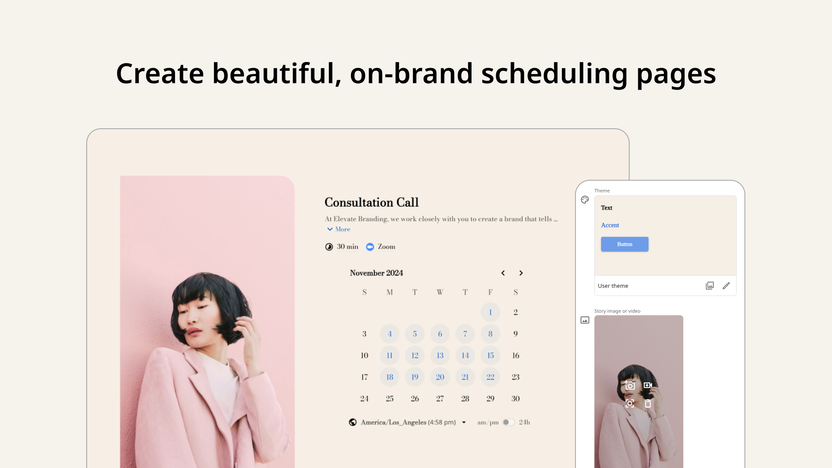
This tool lets you create stunning, brand-consistent scheduling pages. Imagine a scheduling page that reflects your brand’s personality. Zcal offers just that. You can customize fonts, colors, layouts, and even add media. Plus, video introductions help reduce no-shows by giving clients a personal touch. With features like team scheduling, advanced booking options, and seamless integrations with tools like Google Calendar and Zoom, zcal makes managing appointments a breeze. Curious about how zcal can enhance your scheduling? Dive into our detailed review and discover why this could be the perfect tool for your needs. Check out the Zcal Lifetime Deal to learn more. Ready to explore the potential of zcal for your business? Keep reading to find out all the details.

Credit: appsumo.com
Introduction To Zcal
Zcal is a design-focused scheduling platform that allows users to create visually appealing booking pages. It offers extensive customization options, making it ideal for maintaining a brand-consistent experience. Let’s delve deeper into what Zcal is and its purpose.
What Is Zcal?
Zcal is a platform designed to create stunning scheduling pages. These pages are customizable with various fonts, colors, layouts, and media. It ensures that all booking pages match the user’s brand identity, providing a cohesive and professional look.
Purpose Of Zcal And Its Target Audience
The primary purpose of Zcal is to enhance the booking experience for users and their clients. It aims to reduce no-shows by allowing users to add video introductions. This personal touch helps establish a connection before meetings. Zcal is suitable for:
- Freelancers
- Marketing agencies
- Sales managers
Its advanced scheduling options and team scheduling features make it an excellent choice for managing multiple team members’ calendars effortlessly.
Key Features Of Zcal
The Zcal scheduling platform offers a range of features designed to create visually appealing and efficient booking pages. These features help enhance the customer experience while ensuring brand consistency. Let’s explore the key features of Zcal.
Intuitive User Interface
Zcal boasts an intuitive user interface that makes it easy to navigate and use. The design-focused platform ensures that even those with limited technical skills can create stunning scheduling pages. The interface is clean and user-friendly, reducing the learning curve and allowing users to get started quickly.
Customizable Scheduling Pages
With Zcal, you can create customizable scheduling pages that reflect your brand’s identity. Customize fonts, colors, layouts, and media to ensure a brand-consistent experience. Add welcome videos to introduce yourself to clients, reducing no-shows and enhancing engagement.
Integration With Popular Calendar Apps
Zcal integrates seamlessly with popular calendar apps such as Google Calendar, Outlook Calendar, and Microsoft Teams. This integration ensures that your scheduling process is smooth and synchronized across different platforms. Additionally, Zcal connects with Zoom, Stripe, Zapier, and Google Meet, providing a comprehensive scheduling solution.
Automated Reminders And Notifications
Automated reminders and notifications are crucial for reducing no-shows and keeping clients informed. Zcal offers automated email reminders, ensuring that both you and your clients are notified of upcoming appointments. Customize these reminders to suit your needs and ensure that your scheduling process runs smoothly.
Advanced Analytics And Reporting
Track and analyze your booking data with Zcal’s advanced analytics and reporting features. These tools provide valuable insights into your scheduling patterns, helping you make informed decisions and optimize your booking process. Use these analytics to improve client engagement and streamline your operations.
In summary, Zcal’s key features make it a powerful tool for creating Typeform-inspired scheduling pages. With its intuitive interface, customization options, seamless integrations, automated reminders, and advanced analytics, Zcal ensures a professional and efficient booking experience.
Unique Benefits Of Using Zcal
Discover the unique benefits of using zcal, a design-focused scheduling platform. zcal helps you create stunning and brand-consistent booking pages. Let’s explore how zcal can elevate your scheduling process and improve your overall productivity.
Effortless Scheduling
With zcal, scheduling becomes effortless. Use advanced scheduling options to set required or optional hosts, booking limits, buffer times, and custom availability. Sync multiple calendars for collective and round-robin scheduling, ensuring team availability without any hassle.
- Set booking limits and buffer times
- Sync multiple calendars
- Manage team availability
Enhanced User Experience
zcal offers an enhanced client experience with customizable booking pages. Use custom fonts, colors, layouts, and media to design pages that reflect your brand. Add welcome videos to introduce yourself to clients and reduce no-shows, providing a polished and professional booking process.
- Customizable fonts, colors, and layouts
- Welcome videos for introductions
- Brand-consistent booking pages
Increased Productivity
Boost your productivity with efficient team scheduling and integration options. Connect with Google Calendar, Google Meet, Microsoft Teams, Outlook Calendar, Zoom, Stripe, and Zapier. This seamless integration ensures that you never miss a meeting and manage your time effectively.
| Integration Options | Benefits |
|---|---|
| Google Calendar, Outlook Calendar | Effortless schedule management |
| Zoom, Google Meet, Microsoft Teams | Seamless virtual meetings |
| Stripe, Zapier | Simplified payment and workflow automation |
Improved Client Engagement
zcal helps you improve client engagement by using video introductions. Establish a connection and provide context before meetings. Track and analyze booking data with analytics integrations, ensuring you understand client preferences and improve your services.
- Video introductions for better engagement
- Analytics integrations for data insights
- Enhanced client relationship management
Credit: appsumo.com
Pricing And Affordability
zcal offers a compelling lifetime deal that ensures affordability and value. This section explores the pricing structure and how it stacks up against competitors.
Overview Of The Lifetime Deal
zcal provides three license tiers, each packed with extensive features. Here are the details:
| License Tier | Price | Users | Features |
|---|---|---|---|
| Tier 1 | $49 (originally $252) | 3 |
|
| Tier 2 | $129 (originally $840) | 10 | All features in License Tier 1 |
| Tier 3 | $199 (originally $4,200) | 50 | All features in License Tier 1 |
Comparison With Competitor Pricing
Many competitors charge monthly fees for similar services. Here’s a quick comparison:
| Competitor | Monthly Cost | Annual Cost | Features |
|---|---|---|---|
| Competitor A | $20/user | $240/user | Basic scheduling features, limited integrations |
| Competitor B | $30/user | $360/user | Advanced scheduling, some integrations |
zcal’s lifetime deal offers significant savings, especially when comparing the cost over several years.
Value For Money
zcal provides excellent value for money. Key reasons include:
- Comprehensive Features: Access all Pro Plan features with any license.
- One-Time Payment: Avoid recurring monthly fees.
- Brand Consistency: Customizable pages to match your brand.
- Enhanced User Experience: Video introductions and advanced scheduling options.
- Team Collaboration: Efficiently manage team schedules.
- Integration Capability: Connect with major calendar and meeting platforms.
The lifetime deal ensures that you get all these benefits without worrying about monthly costs. This makes zcal a smart investment for freelancers, small businesses, and larger teams.
Pros And Cons Of Zcal
Evaluating the pros and cons of zcal can help you decide if this scheduling tool suits your needs. Below, we break down the benefits and potential drawbacks based on real-world usage.
Pros Based On Real-world Usage
- Customizable Booking Pages: zcal allows you to design visually appealing booking pages with custom fonts, colors, layouts, and media. This ensures your scheduling pages reflect your brand’s identity.
- Video Introductions: Adding welcome videos to scheduling pages can introduce you to clients and reduce no-shows. This feature helps establish a connection before the meeting.
- Team Scheduling: Sync multiple calendars for collective and round-robin scheduling. This ensures team availability and efficient management of team members’ calendars.
- Advanced Scheduling Options: Customize booking limits, buffer times, and availability. This allows you to prevent burnout and manage your team’s availability effectively.
- Integrations: zcal integrates with popular tools like Google Calendar, Google Meet, Microsoft Teams, Outlook Calendar, Zoom, Stripe, and Zapier. This makes it easy to connect with your existing workflow.
- Embed on Website: Seamlessly integrate your scheduling page into your website, providing a polished and professional booking process for your clients.
- Analytics Integrations: Track and analyze booking data to gain insights into your scheduling patterns and client engagement.
Cons And Potential Drawbacks
- Limited Users on Lower Tiers: License Tier 1 only supports up to 3 users. This could be limiting for larger teams or growing businesses.
- Cost for Higher Tiers: While the one-time payment is a good deal, the cost of License Tier 2 and Tier 3 can be high for some small businesses or freelancers.
- Activation Requirement: Users must activate the license within 60 days of purchase. This could be a drawback for those who need more time to decide.
- Potential Overwhelming Features: The extensive customization and advanced options might be overwhelming for users who prefer simpler scheduling tools.
Who Should Use Zcal?
zcal is a powerful tool designed to enhance scheduling efficiency and improve the customer experience. But who exactly benefits the most from this platform? Let’s explore the ideal users and specific use cases for zcal.
Ideal Users And Scenarios
zcal is perfect for professionals and teams who need to manage their schedules while maintaining a consistent brand image. Here are some ideal users and scenarios:
- Freelancers: Freelancers can use zcal to create professional booking pages that match their personal brand. This helps to build trust and streamline the scheduling process.
- Marketing Agencies: Agencies can manage multiple clients and projects by syncing team calendars and using advanced scheduling options.
- Sales Teams: Sales professionals can benefit from video introductions to engage prospects and reduce no-shows. Round-robin scheduling ensures fair distribution of leads among team members.
- Consultants: Consultants can customize booking pages to reflect their brand and use analytics integrations to track client engagement and optimize their services.
- Educators: Teachers and trainers can use custom questions and automated email reminders to manage class schedules and ensure students are well-prepared for sessions.
Specific Use Cases
To further understand who should use zcal, let’s look at some specific use cases:
| Use Case | Description |
|---|---|
| Client Onboarding | Use zcal to create a branded booking page with a welcome video. This helps new clients feel welcomed and informed about the onboarding process. |
| Team Meetings | Sync multiple calendars for collective scheduling. Set up buffer times and booking limits to ensure efficient and productive team meetings. |
| Webinars and Workshops | Embed your scheduling page on your website. Use custom questions to gather necessary information from attendees and manage registrations. |
| Consultations | Integrate payment options with Stripe. This allows clients to book and pay for consultations seamlessly. Use analytics to track booking data and optimize your services. |
Credit: www.planetizen.com
Frequently Asked Questions
What Is Zcal?
Zcal is a scheduling tool that creates Typeform-inspired scheduling pages. It simplifies the appointment booking process with an intuitive user interface.
How Does Zcal Work?
Zcal works by allowing users to create customizable scheduling pages. These pages can be shared with clients to book appointments easily.
Why Choose Zcal Over Other Tools?
Zcal offers a unique Typeform-inspired design. It combines user-friendly aesthetics with powerful scheduling features, making it stand out.
Can Zcal Integrate With My Calendar?
Yes, Zcal integrates seamlessly with popular calendar apps. This ensures your appointments are always up-to-date and synchronized.
Conclusion
Explore the benefits of zcal for your scheduling needs. Its customizable features create a professional booking experience, enhancing client engagement. Perfect for freelancers, agencies, and sales teams. Ready to transform your scheduling process? Get zcal now and experience the difference.

